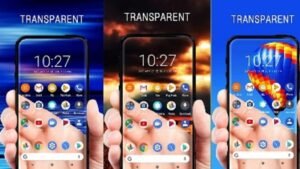

Bring Your Phone Screen to Life with Transparent Live Wallpaper
Want to give your smartphone a unique and futuristic look? A Transparent Live Wallpaper is one of the easiest ways to personalize your device. Instead of using a static background, this type of wallpaper creates the illusion that your phone screen is transparent by displaying the live camera feed behind your apps and icons.
Millions of Android users enjoy transparent wallpapers because they add a modern, eye-catching effect without requiring expensive hardware. Whether you’re looking to impress friends or simply refresh your phone’s appearance, transparent live wallpaper apps offer a fun and customizable experience.
In this guide, you’ll learn what transparent live wallpaper is, how it works, its benefits, potential drawbacks, and tips for choosing the best app.
What Is a Transparent Live Wallpaper?
A Transparent Live Wallpaper is a dynamic wallpaper that uses your smartphone’s rear camera to display the real-world environment as your home screen background. While your phone isn’t actually transparent, the camera feed creates a realistic illusion that makes it appear as though you’re looking straight through your device.
Unlike traditional wallpapers, transparent live wallpapers update continuously in real time, making your home screen feel more interactive and visually appealing.
How Does Transparent Live Wallpaper Work?
Transparent wallpaper apps rely on your phone’s camera and live wallpaper functionality.
Here’s how they typically work:
- Access your device’s rear camera.
- Display the camera feed as the wallpaper.
- Continue showing the live background while you use apps on the home screen.
- Allow customization with transparency effects, animation, or visual filters.
Most apps only activate the camera while you’re on the home screen, helping reduce unnecessary battery usage.
Key Features of Transparent Live Wallpaper
Real-Time Camera Background
The most popular feature is displaying your surroundings as your wallpaper, creating a transparent screen effect.
Live Wallpaper Support
These wallpapers continuously update in real time, making your phone feel more dynamic than a standard image.
Easy Setup
Most transparent wallpaper apps require only a few taps:
- Install the app.
- Grant camera permission.
- Set it as your live wallpaper.
- Customize available settings.
Custom Effects
Many apps include extra features such as:
- HD live wallpapers
- Animated backgrounds
- Transparency adjustments
- Visual filters
- Motion effects
Benefits of Using Transparent Live Wallpaper
Unique Appearance
Transparent wallpapers instantly make your smartphone stand out from ordinary devices.
Fun User Experience
Watching your surroundings appear behind your app icons creates an engaging visual effect.
Personalization
Users can customize effects, animation speed, and visual styles to match their preferences.
Modern Design
Transparent wallpapers give your Android device a sleek, futuristic look without modifying the operating system.
Does Transparent Live Wallpaper Drain Battery?
This is one of the most common questions.
Because the wallpaper uses your phone’s camera and continuously refreshes the display, it generally consumes more battery than a static wallpaper.
However, battery usage depends on several factors:
- Screen brightness
- Camera usage
- Device processor
- Wallpaper optimization
- Display refresh rate
On modern smartphones, optimized wallpaper apps typically have a moderate impact during normal use.
Tips to Reduce Battery Consumption
If you enjoy transparent wallpapers but want better battery life, try these tips:
Lower Screen Brightness
Reducing brightness helps save significant battery power.
Close Background Apps
Freeing system resources allows the wallpaper to run more efficiently.
Choose Lightweight Wallpaper Apps
Some apps are better optimized and consume fewer resources.
Disable When Needed
If you’re traveling or have limited battery, switching temporarily to a static wallpaper can extend battery life.
Is Transparent Live Wallpaper Safe?
Most reputable wallpaper apps are safe when downloaded from trusted app stores.
Before installing any app:
- Check user reviews.
- Verify download numbers.
- Review requested permissions.
- Install updates regularly.
Since these apps require camera access, always understand why permissions are needed and avoid downloading from unknown sources.
How to Choose the Best Transparent Live Wallpaper App
Not all wallpaper apps offer the same experience.
Look for features like:
- Smooth performance
- Low battery consumption
- High-resolution graphics
- Regular updates
- Positive user ratings
- Minimal advertisements
- Easy customization
Reading recent reviews can help you identify apps that perform well on your specific Android device.
Who Should Use Transparent Live Wallpaper?
Transparent live wallpapers are ideal for:
- Android customization enthusiasts
- Users who enjoy unique phone designs
- People who like animated wallpapers
- Tech lovers looking for a futuristic interface
- Anyone wanting to refresh their home screen without buying a new phone
If you frequently personalize your smartphone, this feature can make everyday phone use more enjoyable.
Common Questions
Does Transparent Live Wallpaper work on every Android phone?
Most modern Android devices support live wallpapers, although performance may vary depending on hardware and Android version.
Can it damage my camera?
No. The app simply uses your camera feed while active. It does not physically affect the camera hardware.
Does it work on the lock screen?
Some devices and apps support transparent wallpapers on the lock screen, while others limit the effect to the home screen.
Conclusion
A Transparent Live Wallpaper is a creative way to give your smartphone a modern and eye-catching appearance. By using your device’s camera to create the illusion of a transparent screen, these wallpapers offer a fun and interactive experience that goes beyond traditional backgrounds.
Download
While they may consume slightly more battery than static wallpapers, choosing a well-optimized app and following simple battery-saving tips can help you enjoy the effect without sacrificing performance. If you’re looking for an easy way to personalize your Android device, a transparent live wallpaper is an excellent option worth trying.