
Your phone’s lock screen is the first thing you see dozens of times every day. Why settle for a plain background when you can add something fun and interactive? Zipper lock screens and wallpapers bring a unique twist to Android customization. They let you “pull” a virtual zipper across the screen to unlock your device, combining eye-catching visuals with satisfying animations.
This guide explores everything you need to know about zipper-style lock screens and wallpapers. Whether you’re new to phone customization or looking to refresh your setup, you’ll find practical advice to make your Android device stand out while keeping it secure and easy to use.
What is a Zipper Lock Screen & Wallpaper?
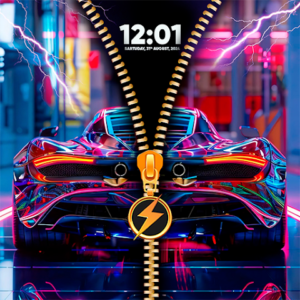
A zipper lock screen and wallpaper is a customization style where the lock screen features a realistic zipper graphic overlaid on your chosen background image. To unlock the phone, you swipe along the zipper path, mimicking the motion of opening a real zipper. This creates a smooth, animated effect that feels engaging and premium.
These designs often include high-resolution wallpapers in various themes — nature, abstract art, portraits, or seasonal images — paired with the zipper overlay. The zipper itself can come in different styles, such as metallic, colorful, or decorative with elements like hearts or stars.
Unlike standard static lock screens, zipper versions add interactivity. Many include sound effects for the unzipping motion or subtle particle animations. This trend has grown popular among users who want their phones to feel more personal and entertaining without complicating daily use.
At its core, it’s about blending security with self-expression. Android’s flexible nature allows these custom looks through various personalization tools available on the Google Play Store.
Key Features and Benefits
Zipper lock screens offer several standout features that make them appealing:
- Interactive Unlocking Experience: The swipe-to-unzip gesture provides tactile feedback that feels more dynamic than simple swipes or PIN entry. Smooth animations enhance this without slowing down your device when optimized properly.
- High-Quality Wallpapers: Most options come with collections of HD and 4K images. You can often match wallpapers to the zipper color or style for a cohesive look.
- Customization Options: Change zipper colors, tab designs (like diamond or lightning bolt shapes), animation speed, and sound effects. Some allow layering effects or adjusting transparency.
- Enhanced Privacy and Security: Many integrate with your existing PIN, pattern, or biometric locks. The zipper acts as an additional visual layer rather than replacing core security.
- Battery and Performance Friendly: Well-designed versions run efficiently in the background. They avoid heavy resource use by activating animations only during unlock attempts.
- Thematic Variety: From romantic heart zippers to modern minimalist designs, there’s something for every taste. Seasonal or mood-based wallpapers keep things fresh.
Benefits extend beyond looks. A personalized lock screen can boost your mood each time you pick up your phone. It also makes your device easier to identify quickly in a crowd, such as on a desk at work or in a bag. For creative users, it serves as a canvas for expressing hobbies, favorite colors, or current interests.
How Zipper Lock Screens Work
Understanding the mechanics helps you get the most out of them. Here’s a general overview of the process:
- Wallpaper Selection: Start by choosing or uploading a high-resolution image that suits your style. The background should have good contrast with the zipper overlay for visibility.
- Zipper Overlay Application: The customization tool places a zipper graphic on top of the wallpaper. You adjust its position, direction (horizontal or vertical), and appearance.
- Animation Setup: Configure how the zipper opens — smooth slide, with sound, or added visual effects like fabric texture simulation.
- Security Integration: Link it to your phone’s built-in lock methods. The zipper swipe leads to the standard unlock prompt (PIN, fingerprint, etc.).
- Activation: Once set, the lock screen displays the combined wallpaper and zipper. Swiping along the zipper path triggers the unlock sequence.
- Preview and Adjust: Most tools offer real-time previews so you can test before committing changes.
The technology relies on Android’s overlay and animation capabilities. Modern versions use efficient rendering to ensure the effect feels responsive even on mid-range devices.
Advantages and Limitations
Like any customization, zipper lock screens have pros and cons.
Advantages:
- Standout visual appeal that differentiates your phone.
- Fun factor that makes routine tasks more enjoyable.
- Easy to update for different occasions, such as holidays.
- Can encourage mindful phone use by adding a small moment of delight.
- Compatible with most Android versions when using appropriate tools.
Limitations:
- Some designs may consume slightly more battery if animations are complex or always active.
- Overly intricate zippers might feel less intuitive for quick unlocks in bright sunlight.
- Not all options integrate perfectly with every phone manufacturer’s custom interface (like Samsung One UI or Xiaomi MIUI).
- Accessibility considerations: Users with motor challenges might prefer simpler gestures.
- Potential for visual clutter if not configured carefully.
Being aware of these helps you choose setups that enhance rather than hinder your experience. Many users find the benefits far outweigh minor drawbacks when they select lightweight, well-reviewed options.
Best Practices and Tips
To get excellent results with zipper lock screens and wallpapers, follow these practical tips:
- Choose Compatible Wallpapers: Opt for images with balanced lighting and resolution above 1080p. Vertical orientation works best for phone screens. Test how the zipper contrasts with busy backgrounds.
- Optimize for Performance: Select versions that let you adjust animation quality. Disable unnecessary sound effects if battery life is a priority.
- Match Your Device Theme: Coordinate zipper colors with your home screen icons or overall theme for a polished look.
- Regular Updates: Refresh wallpapers periodically to avoid visual fatigue. Many collections include new additions regularly.
- Test in Different Conditions: Check visibility outdoors, in low light, and with notifications showing. Adjust brightness and contrast accordingly.
- Combine with Widgets: On supported Android versions, add useful widgets like weather or calendar that complement the zipper design without overlapping the swipe area.
- Backup Your Settings: Before major changes, note your current configuration or take screenshots for easy restoration.
- Security First: Always keep strong biometric or PIN protection active. The zipper should enhance, not replace, security.
Experiment gradually. Start with a simple design and build complexity as you get comfortable. Pay attention to how the setup feels during daily use rather than just initial impressions.
Common Mistakes to Avoid
Even experienced users sometimes run into issues. Here are pitfalls to watch for:
- Ignoring device compatibility, leading to glitches or forced closes.
- Overloading with too many effects, which can slow down the lock screen response.
- Using low-quality images that pixelate or look blurry on high-resolution displays.
- Neglecting to test battery impact over a full day of use.
- Forgetting to update the customization tool, missing performance improvements or bug fixes.
- Placing the zipper in awkward positions that interfere with notifications or quick settings.
- Relying solely on the zipper without a secondary secure lock method.
Avoiding these keeps your experience smooth and frustration-free. If something doesn’t feel right, revert to defaults temporarily and tweak one setting at a time.
Frequently Asked Questions
What makes a zipper lock screen different from regular wallpapers?
It adds an interactive layer with swipe animation on top of a static or live wallpaper. This creates engagement during unlocking that plain images lack.
Do zipper lock screens affect phone performance?
Lightweight options have minimal impact. Choose well-optimized designs and monitor battery usage initially. Most modern Android devices handle them without noticeable slowdowns.
Can I use my own photos as zipper wallpapers?
Yes, many customization tools support gallery images. Crop and edit them for best fit before applying the zipper effect.
Are these safe for daily use?
When obtained from trusted sources like the Google Play Store and combined with standard security, they are generally safe. Stick to popular, frequently updated options.
How do I switch back to a standard lock screen?
Go into your phone’s display or lock screen settings and disable the custom overlay. Restarting the device can also help reset changes.
Will zipper effects work on any Android phone?
Compatibility is broad but varies by Android version and manufacturer skin. Newer devices (Android 10+) usually offer the best support.
Conclusion
Zipper lock screens and wallpapers offer a creative, interactive way to personalize your Android device. They transform a routine interaction into something visually appealing and satisfying while maintaining security and usability.
By understanding the features, following best practices, and avoiding common mistakes, you can create a lock screen that truly reflects your style. Take time to experiment with different designs and find what works best for your daily routine.
Explore the personalization options available on the Google Play Store and start customizing today. Your phone deserves to feel uniquely yours every time you pick it up.