
The Nokia 1280 holds a special place in many hearts as a durable, no-nonsense feature phone from the early 2010s. Its simple interface, reliable performance, and iconic design still appeal to users seeking a break from complex smartphone UIs. In 2026, several Android launchers bring this nostalgic experience to modern devices.
This guide reviews the best Nokia 1280 Launcher options, their features, installation tips, and how to choose the right one for your needs.
What Is a Nokia 1280 Launcher?
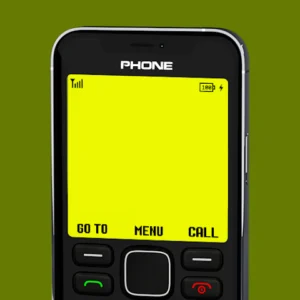
A Nokia 1280 Launcher is an Android app that transforms your phone’s home screen, menu, icons, and sounds to mimic the classic Nokia 1280 feature phone. These launchers typically include monochrome displays, T9-style input simulation, retro wallpapers, and original ringtones while still allowing access to your Android apps.
They are popular for nostalgia, minimalism, or reducing screen time distractions.
Key Features of Top Nokia 1280 Launchers
- Authentic retro UI with green-on-black or classic color schemes.
- T9 keypad simulation for dialing and navigation.
- Classic Nokia ringtones and keypad tones.
- Customizable wallpapers and themes.
- Lightweight design with low battery and RAM usage.
- Easy switching back to your default launcher.
- Additional fun elements like Snake game emulations.
Top Nokia 1280 Launcher Apps in 2026
1. Nokia Launcher – Nokia 1280 (by Vk.soft / Dicapp)
This highly rated app stands out for its faithful recreation of the Nokia 1280 experience.
Highlights:
- Full retro home screen and menu.
- T9 keypad and hotkey navigation.
- Classic wallpapers, icons, and sounds.
- Good performance with frequent updates.
- Positive user feedback for nostalgia factor.
2. Nokia 1280 Launcher by UniTiki
A popular choice with millions of downloads, offering a smooth retro transformation.
Highlights:
- Wide selection of Nokia themes.
- Vintage call icons and phone colors.
- Easy customization options.
- Reliable and lightweight.
3. Other Classic Phone Launchers
Several alternatives provide similar Nokia-style experiences with slight variations in design accuracy and extra features like more themes or performance tweaks.
How to Install and Set Up a Nokia 1280 Launcher
- Download the app from the Google Play Store (search for “Nokia 1280 Launcher”).
- Open the app and follow the on-screen instructions.
- Grant necessary permissions.
- Set the launcher as your default home screen app when prompted.
- Customize settings like wallpapers, ringtones, and navigation.
- To switch back, long-press the home button or use the app’s built-in option.
Advantages and Limitations
Advantages:
- Strong nostalgia and simplicity.
- Reduces visual clutter and distractions.
- Low resource usage.
- Fun for retro enthusiasts.
- Easy to toggle on and off.
Limitations:
- May limit access to some modern Android gestures and widgets.
- Not all apps integrate perfectly with the retro interface.
- Some versions contain ads (removable via purchases).
- Less suitable for heavy app users who need quick access.
Best Practices and Tips
Choose a launcher with good recent reviews and updates for compatibility with the latest Android versions.
Test the launcher for a few days before committing fully.
Customize minimally at first to enjoy the authentic feel.
Use it alongside a minimal icon pack for better cohesion.
Keep your default launcher accessible for productivity tasks.
Combine with grayscale mode or focus apps for a true minimalist experience.
Common Mistakes to Avoid
- Installing unverified APKs from unknown sources.
- Expecting full modern functionality in retro mode.
- Ignoring battery or performance on older devices.
- Forgetting how to switch back to your original launcher.
Frequently Asked Questions
Are Nokia 1280 Launchers safe?
Reputable ones from the Play Store are generally safe. Always check permissions and reviews.
Will it slow down my phone?
Most are lightweight and optimized, but performance depends on your device.
Can I still use all my apps?
Yes, but some may require switching to the default launcher temporarily.
Is there a cost?
Most are free with optional in-app purchases to remove ads.
Do they work on all Android phones?
They work on most devices running Android 5.0 or higher, though newer versions offer better compatibility.
Conclusion
The best Nokia 1280 Launcher for Android in 2026 brings delightful nostalgia while keeping the power of modern smartphones underneath. Whether for fun, minimalism, or a digital detox, these apps deliver an authentic retro experience.
Try one of the top-rated options today and rediscover the simplicity of classic Nokia phones on your Android device. Switch anytime if you need full-featured access — the best of both worlds is just a tap away.
FAQ Section
Q1: Which launcher is the most authentic?
Nokia Launcher – Nokia 1280 by Vk.soft is frequently praised for its close recreation.
Q2: Can I play Snake on these launchers?
Some versions include classic games like Snake for extra nostalgia.
Q3: How do I remove the launcher?
Go to Settings > Apps > Default apps > Home app and select your original launcher.
Q4: Are there iOS versions?
These are primarily Android apps, as iOS has stricter customization limits.
Q5: Do they support dark mode or modern features?
Basic support exists, but the focus remains on retro styling.